
You can amend or cancel an exam booking directly from your ExamTrack account, free of charge, up until the event’s closing date for entries.
How to cancel a learner’s exam booking:
Log in to your ExamTrack account https://lamda.examtrack.co.uk/
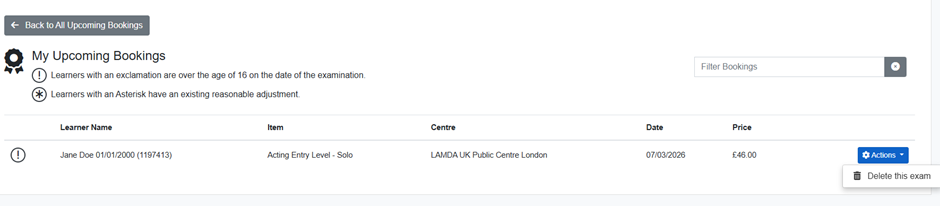
Go to the My Bookings tab.
Find the relevant exam event and select the Actions button.

Choose Delete this exam for the learner you wish to withdraw.
Amending a Booking:
If you need to:
Change the exam date, or
Amend the exam or grade
Please cancel the existing booking using the steps above and then re-enter your learner following the usual booking process.
If you re-book a new exam right after, the original exam fee will automatically be transferred towards the new booking. The basket will update for any remaining fee due which will need to be paid in order to confirm the new booking. If the new exam is less than you originally paid ExamTrack will automatically refund the remaining amount.
Refunds:
Once the learner’s exam has been deleted, a refund can be processed from the basket of your ExamTrack account.
Refunds are issued to the original payment method and will be received within 5 working days.
You will also receive an automated email confirmation shortly after the cancellation.
Changing Exam Centre:
If you wish to change the original Public Centre your learner was entered for, please ensure that the new Centre’s closing date has not yet passed before cancelling and rebooking.
Please note that, if you choose to amend your exam booking, depending on the demand for the event, you may not be able to re-book your exam.